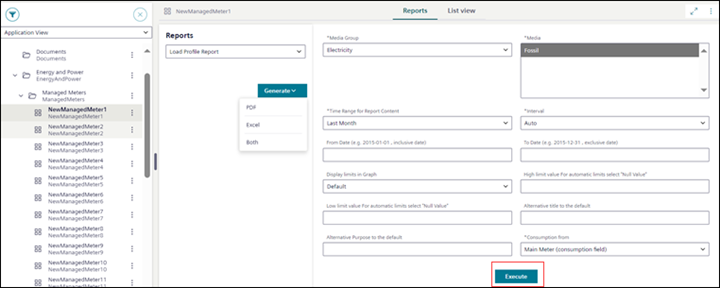
You want to execute an advanced report in PDF, Excel, or Both formats.
System Browser is in Application View.
In Application View, select the System Browser object on which a web application rule is configured. For example, select System Browser object ManagedMeters > NewManagedMeter1 on which [Load Profile Report] web application rule is configured.
The Reports tab displays.
From the Reports drop-down list, select the web application rule, for example, the [Load Profile Report] rule.
Select Generate and then select one of the following formats:
PDF
Excel
Both
In the parameter information section fill in the parameter values for advanced report execution.
The parameter values change depending on their value type and the selected web application rule from the Reports drop-down list.
For some of the report parameters (such as Time Range for Report ContentInterval, Display limits in Graph, and Consumption From) their default values are auto-filled.
The fields that are marked with (*) are mandatory and without selecting or not entering these mandatory field values, the Execute button is not enabled.
If the advanced report design includes the use of cascading parameters (that is, one drop-down list value gets filtered on the selection of the parameter value in the other drop-down list) and there are any issues with the selection of the cascading parameters, then contact your company's librarian.