Executing a Treatment Form Step in Assisted Treatment
You are in Flex Client assisted treatment and the operating procedure includes a treatment form step (configured as Execution Mode as Manual in the Installed Client) that you want to do.
Scroll the steps list, and select the [Treatment form step].
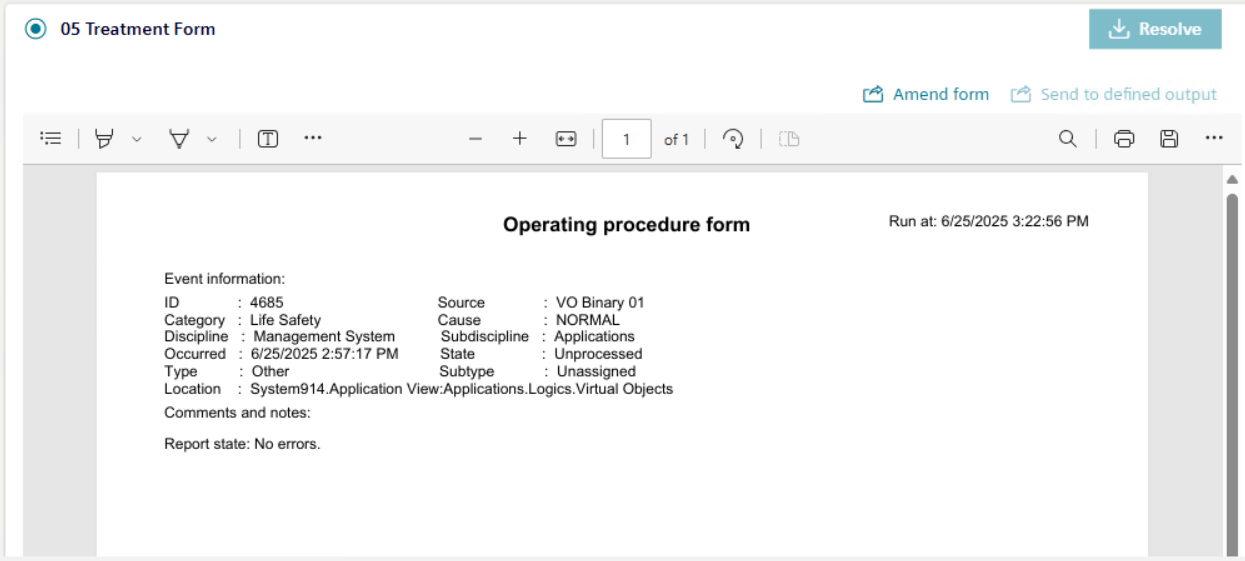
The pre-configured report displays in the report area.
Select the Amend form and complete the form using the provided controls (for example, editable fields or drop-down list) to specify the necessary information.
When configuring the [Treatment form step], if the step is set to Repeatable = Yes then you can add or modify the comment or change the text group selection multiple times.
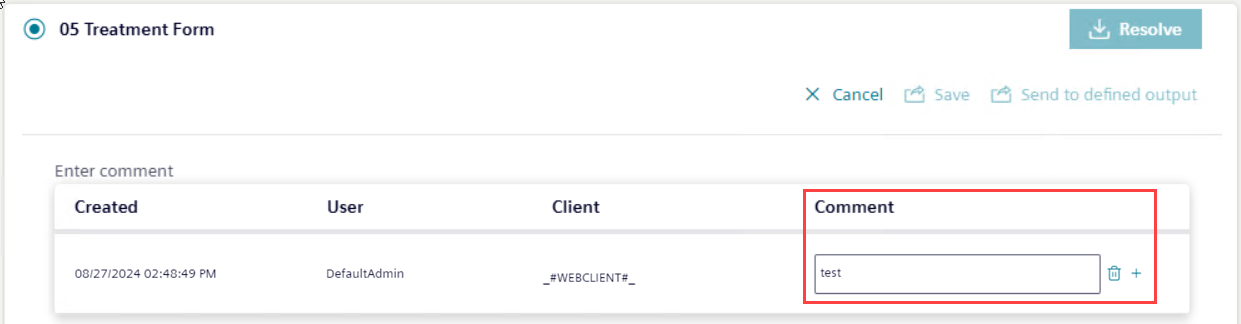
Add a comment in the Comment column.
(Optional) Select icon to add a new row.
(Optional) Select icon to delete an existing row.
Select Save.
The preview of the form displays with the latest data.
(Optional) Select Cancel to cancel the form details.
Select Send to defined output.
The output report is routed to a file, email, or printer, depending on the output location defined in the report template. If the output location is not defined in the report template, then the output files are located at [Installation Drive C]:\[Installation Folder]\[Project Name]\ FlexReports.
In Flex Client, when you navigate from the treatment form step to any other configured assisted treatment step or switch to a different tab, then on coming back to the same treatment form step, a new PDF is generated each time at the location: [Installation Drive C]:\[Installation Folder]\[Project Name]\ FlexReports.
From the report area, you can use the incorporated controls to print to PDF, highlight, zoom in, zoom out, fit to width, page view, or search the content of a report.
By default, the report preview is shown as a PDF. -If Excel format is configured as output, then Excel is generated in the configured output folder. -You cannot preview an Excel export. You can only select the corresponding row in the History area and select Send to defined output to download the file locally.
If multiple PDF files are generated for an event that has triggered assisted treatment and the operating procedure includes the treatment form step, then the history area is displayed showing an entry for the report and sub-entries for all individual PDF files. -You can select the individual PDF files in the History area and the respective PDF gets displayed in the preview area. After the report is generated, displayed, and sent to defined output, only then the step can be marked as resolved.