Recipients Workspace for Mobile Flex
To view the Recipient workspace, rotate your mobile screen and navigate to Notification > Recipients.
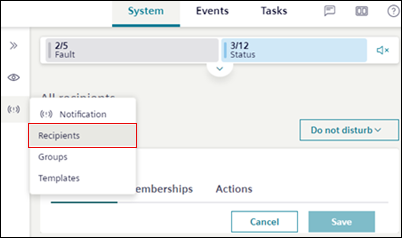
Recipients Workspace
1 | Recipients | Displays the list of recipients with their state. |
2 | Search | Allows searching for a recipients by name or state. |
3 | Add | Navigates to the New recipient window and allows you to add a new recipient to the system. |
Recipient Information
1 | Profile | Displays User profile, Contact and Date/time format sections. |
2 | Edit | Allows you to edit general information of the recipient. |
3 | Back button | Navigates back to the recipient list. |
4 | Do not disturb | (Applicable only for Reno Plus users) Allows you to set recipient state to Do not disturb mode from the time options available from the Do not disturb drop-down. You can customize the date and time using Customize option. See Set Recipient State in Creating and Managing Recipients. |
5 | Contact | Allows you to add or edit the work or private email, phone number, or pager number of the recipient. |
6 | | Displays Add email and Add phone options that allows to add multiple emails and phone numbers. |
7 | | Deletes any specific entry. |
8 | Date/time format settings | (Applicable only for Reno Plus users) Allows you to set the time zone. |
Memberships
1 | Membership | Displays the group membership and current membership state of the recipient. |
2 | | Displays Leave option that removes recipient name and access from the group. |
Actions
1 | Actions | Displays the following options:
|
2 | Block account | (Applicable only for Reno Plus users) Allows you to block recipient account. |
3 | Delete account | Removes the recipient's account permanently from the mobile Flex. See Delete Recipient in Creating and Managing Recipients. |