Creating and Managing Recipient in Mobile Flex
This section provides step-by-step instructions on how to add, update, and delete recipients in the mobile Flex web app.
- Tap and select System.
- Rotate your mobile screen to view the left side bar.
- In the left side bar, tap and navigate to Notification > Recipients.
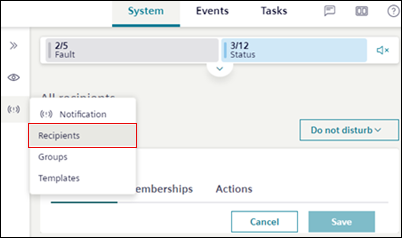
- A list of all the recipients with their state displays.
- Do any of the following:
- To add new recipients, tap Add and enter the recipient details in the Profile tab.
- To edit the recipient details, select the recipient to be edited and tap Edit in the Profile tab.
- To block the recipient, select the recipient and tap Block account in the Action tab.
- To delete the recipient, select the recipient and tap Delete account in the Action tab.