Notification Groups
This section provides reference and background information for handling groups in the Flex Client Notification. For related procedures, see the step-by-step section.
Groups Workspace
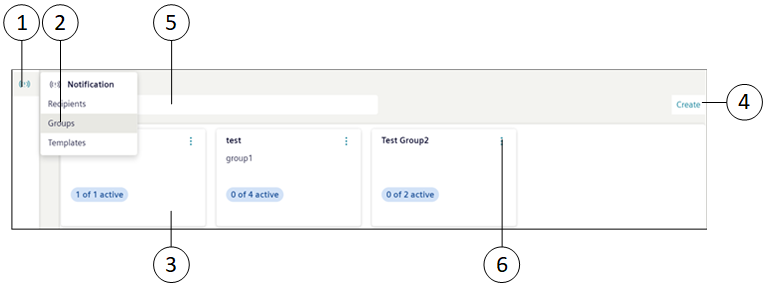
Item | Name | Description |
1 | Notification | Displays the list of following Notification objects:
|
2 | Groups (workspace) | Displays all the groups with their details. |
3 | Groups (tile) | Displays the name and description of the group. (Applicable only for Reno Plus users) Displays the number of active recipients out of total number of recipients in the group. |
4 | Create | Creates a new group. See Create Group in Creating and Managing Groups. |
5 | Search | Search for a specific group by name. |
6 | | Displays the following options:
|
Group Details
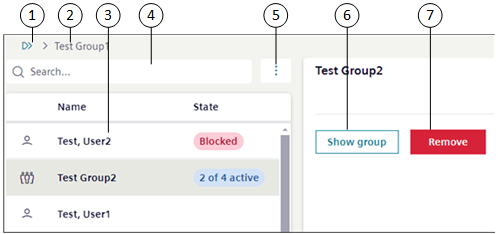
Item | Name | Description |
1 | | Navigates to the Group Workspace page. See Groups Workspace in Notification Groups. |
2 | Group name | Displays the current name of the group. |
3 | Recipient list | Displays the list of all the recipients and groups which are part of the group. (Applicable only for Reno Plus users) Group displays the number of active recipients out of total number of recipients in the group. |
4 | Search | Search for a specific recipient or group by name. |
5 | | Displays the following options:
|
6 | Show group | Navigates to the selected group. |
7 | Remove | Removes the recipient or group from the group. |